
Are you thinking about using a billing system? In this guide, we’ll take a closer look at billing systems and how they can help you run your business.
The most important part of running a business is selling your products and services, as well as maintaining good client relationships. Your goal should be to spend only the necessary time on administrative work and dedicate yourself to sales, marketing and other activities that generate revenue. A billing system can help you speed up your admin!
Let’s take a look at how billing systems can help you work faster, smarter, and more efficiently.
What is a billing system?
A tool that lets you create, store, manage and follow up on invoices is called a billing system, billing software or invoicing software.
Unlike invoice templates, billing systems are made to speed up the billing process: simply fill out the fields and send the invoice to your clients, directly from the software! With a billing system, you can also usually automate part of the process, for example by setting up automated reminders when a payment is overdue or enabling recurring invoices. Additionally, a billing system can help you get an overview of your business and your cash flow by generating reports.
Create invoices with Conta
Say goodbye to the hassle of creating invoices! The billing system from Conta streamlines the process, allowing you to breeze through it in under 2 minutes. Just enter client details and product and price information, and send your professional invoices straight to your client.
Why should you have a billing system?
Having a billing system is a strategic move for any business, contractor or freelancer. Here’s why having a billing system matters:
1. Efficient invoicing
A good billing system speeds up your invoicing and saves you time and effort. You can save your contact information, payment details, client information, and product and services, so that everything can be automatically added to your invoice.
For example, if you run a software development company with a monthly subscription plan, a billing system could be set up to automatically invoice your subscribers every month and notify you and your customers if a payment is overdue. That’s efficient invoicing.
2. Accurate billing
When you’re invoicing, details matter. Billing systems helps you avoid errors by automatically calculating prices, tax and discounts, and reusing client information and product and service information. The billing system will also let you know if there is any information missing before you send your invoice.
Correctly invoicing your client is an important step to avoid disputed invoices.
3. Data analysis
Billing systems aren’t just about transactions; they’re also a way to access important data about your business. You can get valuable insights through data analysis, which will help you understand payment trends, client behaviours, and the financial status of your business. Most importantly, it’s easy to see which clients and invoices you need to follow up with.
See also: How to handle overdue invoices
What billing system should I use?
Conta is a free billing system used by more than 300 000 businesses worldwide.
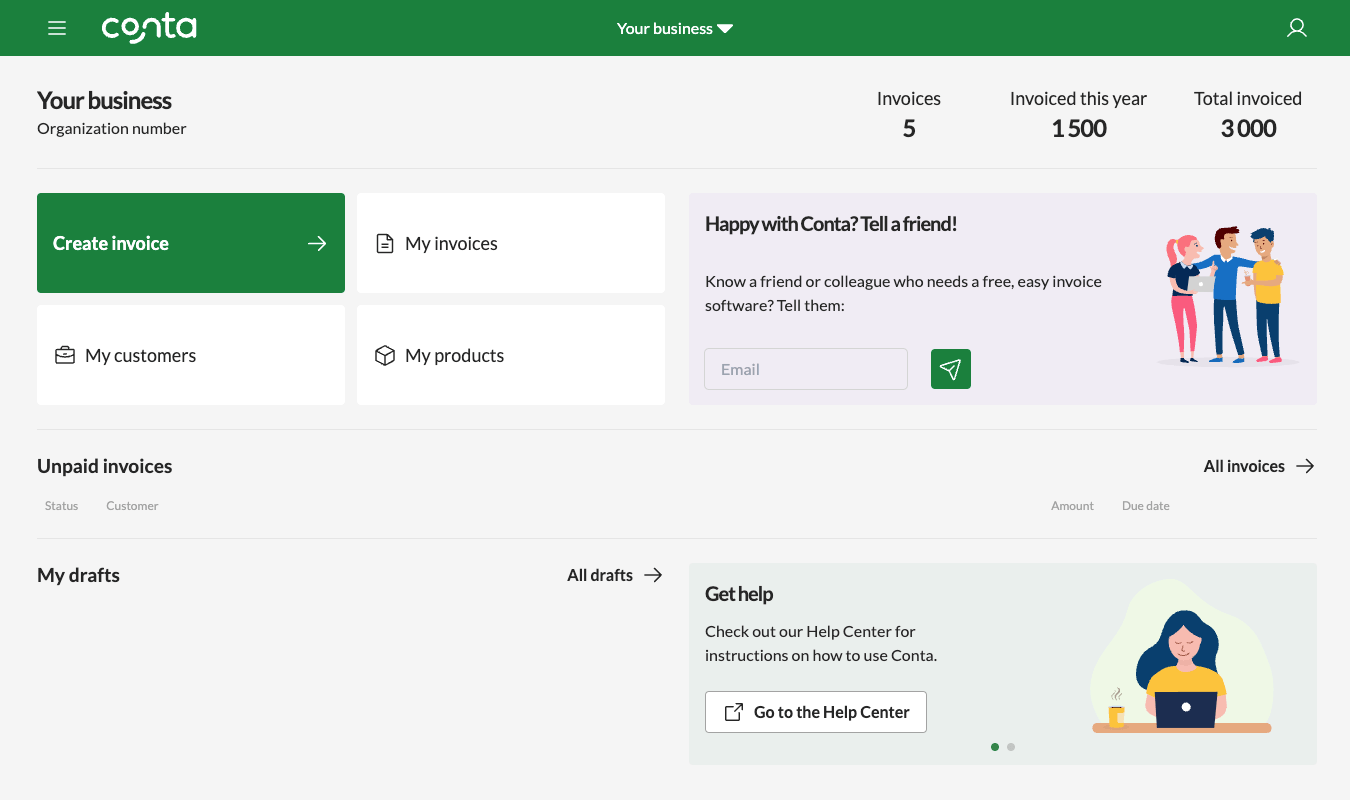
You can create an unlimited amount of invoices, making it an ideal choice if you’re looking to save money on software and reduce costs in your budgets.
These are the key features of Conta
- Easy invoice creation: Create professional invoices in a few minutes. You can send the invoices directly to your clients’ emails or download a PDF that you can print and send mail to your customers.
- Track payments: With Conta, tracking payments is: When a client pays, simply click to mark the invoice as paid. If a client forgets to pay, we’ll notify you via email, and you can resend the invoice directly from the software.
- Intuitive dashboard: Conta’s user-friendly dashboard gives you a comprehensive overview of your income as well as your due and overdue invoices.
- Always available: Conta can be used on your computer or your phone so that you can invoice from the office, from home or on the go.
See also: How to send an invoice
How to use a billing system
Create invoices
It’s easy to create invoices with a billing system. Just sign up and the system guides you through making your first invoice. Make sure to check out these 5 invoicing tips for beginners.
Track payments
Following up on payments is an important part of invoicing. Billing systems help you track payments by showing you a list of paid and overdue invoices, and you can also resend overdue invoices with the click of a button, or set up automated reminders that get sent to your clients when they haven’t paid by the due date.
Automate the billing process
As you become acquainted with your invoicing system, you can improve your invoicing by turning on automated features, such as recurring invoicing, which means you can automatically send invoices to clients on a weekly, monthly, or yearly basis.
Finding the best billing system for your business
It’s important to choose something that suits your needs. This is what you should think about before you make a decision:
- Consider what you and your business need, not just now, but also as you continue to grow. Do you require automation features? Do you need accounting software too? Avoid unnecessary features and prioritize what’s important to you.
- Look at user feedback, sign up for a demo or take advantage of free trials so that you can make an informed decision. You can also try out invoicing software, to see if it covers your needs.
- Strike a balance between your budget constraints and your invoicing needs. Consider the long-term value it provides to your business before making a final decision.
These are 10 questions to ask before choosing an invoice software.
Frequently asked questions
Yes. Every feature is free to use for 30 days, and you don't need a card to start. We're also adding new features frequently, including the free mobile app you can use to send invoices on the go.
No. Conta is built so anyone can send their first invoice in minutes, no accounting background needed. Add a customer, add what you sold, and send. That's it.
Yes. Your invoices and customer data are encrypted and stored securely, and you can export everything at any time. We never sell or share your data with third parties.
Nothing gets deleted. Your account switches to read-only, so you can still open and export every invoice and all your data. To keep sending invoices, choose a plan whenever it suits you.
No, Conta is cloud-based, so you don't need to install or download anything. All you need is a browser and an internet connection. With the free mobile app, you can even send invoices from your phone.
Invoicing software saves you time compared to filling out templates by hand, reduces the risk of errors, and remembers your clients and products for reuse. With Conta, you can send invoices to a client's email directly, or download PDFs to send yourself.
You can create and send an unlimited number of invoices during your 30-day trial.
Yes, Conta generates PDF invoices which you can send to your client's email directly from the system, or download and send manually.
A quote is a price estimate you send before you start work. An invoice is a bill for products or services you've sold, usually sent after the work is complete, requesting payment.