
Quotes and invoices are both part of the sales process of professional businesses and freelancers. Let’s take a look at the differences between a quote vs. invoice.
What is a quote?
A quote is an offer that you send to potential customers so that you can both agree on the details of the sale. Most importantly, it shows an estimate of the costs. A quote can also be called a quotation, sales quote, or a price quote.
Customers can ask for quotes when they’re considering a big purchase, or if they need internal approval before giving you the green light.
If the client doesn’t ask for a quote, it can be a good idea for you to suggest it. That way you can iron out all the details in advance, and avoid confusion, a disputed invoice or—worst case–a refusal to pay.
You might have to amend the quote before the customer agrees to it, but don’t worry, that’s part of the reason why you provide a quote, and a little bit of work ahead of time can save you a lot of headache down the road.
What should a quote include?
A quote can also be called an estimate, but a quote is usually more formal than throwing out a ballpark figure.
The quote should include all the information that the invoice will eventually include. This is because the point of sending a quote is to avoid unpleasant surprises on your part or the customers’ part when you send the invoice.
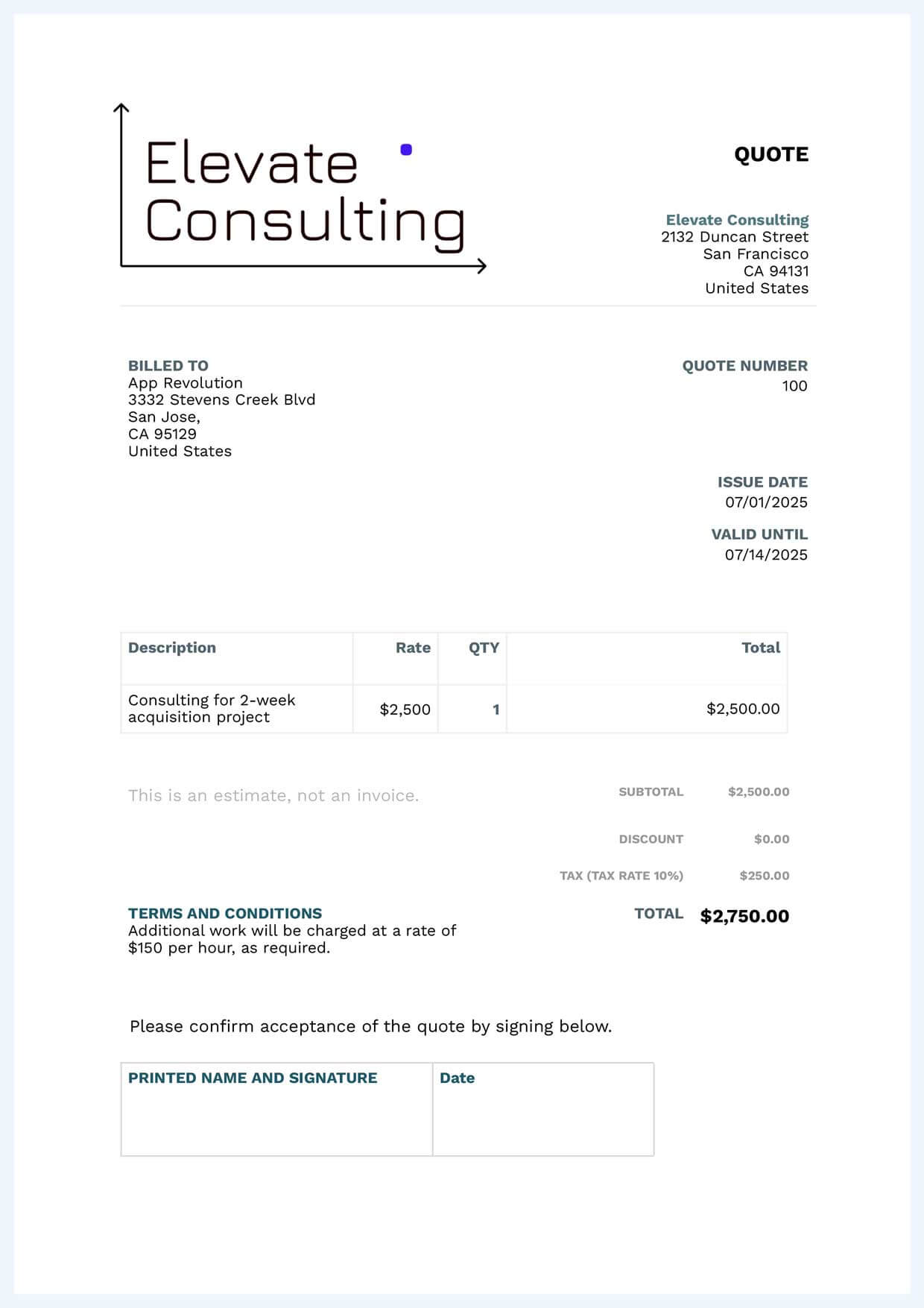
That means the quote should include:
- the header ‘quote’ or ‘quotation’
- the date the quote was created, and how long the quote is valid for
- your contact details and the customer’s contact details
- a description the products, services or projects you’re going to provide, along with prices
- consumption tax and discounts, if applicable
- delivery or shipping costs, if applicable
- payment terms, in other words, how and when the buyer should pay
- other relevant information, such as the timeframe, and information about warranties or returns
If the quote is for a project or service, you should make sure to specify that additional work might be required. You should specify the terms of the additional work—for example whether the client has to approve it—and the price, for example an hourly rate.
It’s also a good idea to include your logo to make the quote look more professional and recognizable.
Download a free quote template now
This is an example of a quote for consultant work:
What is an invoice?
An invoice is sent after a product is delivered or a service or project is completed. The invoice shows which product or services were sold, and requests payment from the customer.
The best way to make invoices is to use invoicing software. Then you can be sure that the invoice includes all the necessary details for you to get paid on time.
What should an invoice include?
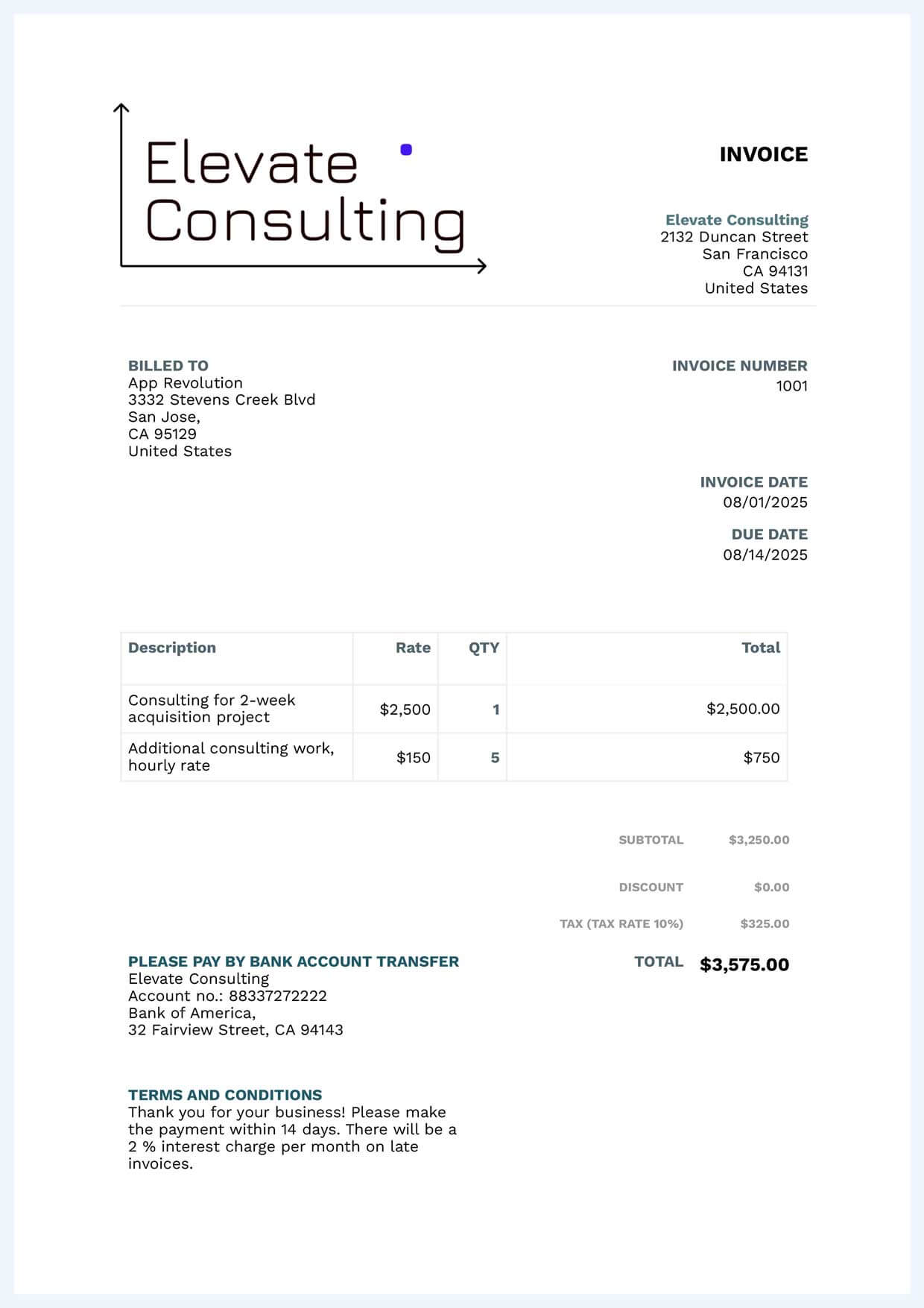
If you’ve sent a quote in advance, your invoice should look exactly the same, except for these important differences:
- Due date, your invoice should have the date that payment is due by
- Invoice number, each invoice has to have a unique number
- The actual costs, if there were any extra work, make sure to reflect that in the invoice
- The delivery date, the day you provided the goods or service
This is an example of an invoice for the same consultant work as above:
Quote vs. invoice
These are some of the most important differences between quotes and invoices:
| Quote | Invoice | |
|---|---|---|
| When is it sent? | Before the sale | After the sale |
| What is the purpose? | To estimate costs | To request payment |
| What is the due date? | The date the quote expires | The date payment has to be made by |
| Which costs are included? | Estimated costs | Actual costs |
Frequently asked questions about quote vs. invoice
Yes. Every feature is free to use for 30 days, and you don't need a card to start. We're also adding new features frequently, including the free mobile app you can use to send invoices on the go.
No. Conta is built so anyone can send their first invoice in minutes, no accounting background needed. Add a customer, add what you sold, and send. That's it.
Yes. Your invoices and customer data are encrypted and stored securely, and you can export everything at any time. We never sell or share your data with third parties.
Nothing gets deleted. Your account switches to read-only, so you can still open and export every invoice and all your data. To keep sending invoices, choose a plan whenever it suits you.
No, Conta is cloud-based, so you don't need to install or download anything. All you need is a browser and an internet connection. With the free mobile app, you can even send invoices from your phone.
Invoicing software saves you time compared to filling out templates by hand, reduces the risk of errors, and remembers your clients and products for reuse. With Conta, you can send invoices to a client's email directly, or download PDFs to send yourself.
You can create and send an unlimited number of invoices during your 30-day trial.
Yes, Conta generates PDF invoices which you can send to your client's email directly from the system, or download and send manually.
A quote is a price estimate you send before you start work. An invoice is a bill for products or services you've sold, usually sent after the work is complete, requesting payment.